A while ago, I created an AppleScript that allows you to compress files and folders by simply dropping them onto the applet.
One of the readers left a comment asking for a way to achieve the following tasks:
Select a folder from Finder.
Store the folder name as “x”.
Compress all files and sub-folders within the folder “x”, including their paths.
Rename the resulting zip file as “x.zip”.
Delete all the files that were used to create the zip file.
With the help of ChatGPT – and because I wanted to be lazy about it – I was able to come up with a solution to this challenge, which can be a great way to manage archives if that’s important to you.
I must admit that ChatGPT did a decent job in generating the AppleScript, but there were some bugs that I had to fix manually. Nevertheless, it’s both scary and exciting to have a tool that can generate usable code.
As always, you can run this script using FastScripts from your menu bar for quick and easy access.
-- choose files or folders to archive since AppleScript can't seem to allow both at once...set archiveOption tobutton returnedof (display dialog "Archive files or folders?" buttons {"Cancel", "Folders", "Files"} default button 3)
-- now let's choose what we want to archive...if archiveOption is"Files"thenset selectedItems to choose file withprompt"Select files you want to compress:"with multiple selections allowed
elseif archiveOption is"Folders"thenset selectedItems to choose folder withprompt"Select folders you want to compress:"with multiple selections allowed
elseif archiveOption is"Cancel"thenreturnendif-- set the array of files or folders selected...if the selectedItems is {} thenreturnelseif (selectedItems count) is equalto1thenset thePathFilename to the quoted form of POSIX pathof (selectedItems as string)
elseset thePathFilename to {}
repeatwith i from1to (selectedItems count)
copy (quoted form of POSIX pathof (item i of selectedItems as string)) &spacetoendof thePathFilename
endrepeatset thePathFilename to thePathFilename as stringendif-- coerce a date string for the archive nameset currentDate to current date
set yearStr to year of currentDate as stringset monthStr to (month of currentDate as integer) as stringif length of monthStr =1thenset monthStr to"0"& monthStr
set dayStr to day of currentDate as stringif length of dayStr =1thenset dayStr to"0"& dayStr
set currentDateStr to yearStr &"-"& monthStr &"-"& dayStr
-- next, let's name our archive, which defaults to "Archive" & the currentDateStr we just coercedset archiveName totext returnedof (display dialog "Enter a name for your archive:" default answer "Archive "& currentDateStr buttons {"Cancel", "OK"} default button 2)
-- then, let's choose where to save the archive and compress it with the shell "zip" commandset archiveFile to POSIX pathof (choose folder withprompt"Choose a location to save the archive:")
do shell script "cd "& quoted form of archiveFile &" && zip -r "& quoted form of archiveName &".zip "& thePathFilename
-- finally, let's delete the files we just archived if we decide we don't need them around anymore.set deleteFiles tobutton returnedof (display dialog "Do you want to delete the original files?" buttons {"Yes", "No"} default button 2)
set deleteOption tofalseif deleteFiles is"Yes"thenset deleteOption totrueendifif deleteOption is equaltotruethenif selectedItems is not {} thenset fileList to {}
repeatwith itemPath in selectedItems
setendof fileList to quoted form of POSIX pathof itemPath
endrepeatrepeatwith fileItem in fileList
do shell script "rm "& fileItem
endrepeatendifendif
No matter how well-intentioned we are, sometimes we allow things to sneak into our lives under the guise of it being something important.
We ask “Who else can do this?” Or maybe we tell ourselves “No one else is qualified enough, so I’m the one who has to do it.”
When we start thinking like this, it’s our ego calling the shots. Maybe we want to be the hero, or we worry those who needed us in the past no longer will and that we won’t be their go-to person anymore.
Our ego persuades us take on more and more, forcing us to say yes when our heart is telling us we should be saying no. Before we know it, the commitments have piled up on us again.
We wake up one day and realize we’ve allowed so many things back into our lives that we dread getting out of bed and facing them. We’re over-committed again and can no longer see the forest for the trees in our lives.
When this happens to me, I make a day of solitude away from distractions and reflect on how I got to this point again. Then I figure out what I need to do to get life back on track.
I accept I won’t always be able to say no when I should. The only thing I can do is learn from caving in to my ego and grow from it.
When I’m stretched thin, these are some of the things I do to start cutting out the commitments that I should have said no to from the beginning.
Who’s Affected?
I ask myself who’s affected most?
Naturally, the person I’ll be letting down will be disappointed, but I ask myself who else has been neglected because I have so much on my plate?
Usually it’s my family that suffers most when I allow distractions. It’s easy to forget these are the important relationships to nurture. They’re the ones that are always the closest, so it’s easy to put them on the back burner. I learn more and more when I overcommit that I should be guarding these relationships fiercely.
Not only does my family suffer, but so does my health. I end up having so much going on that I don’t get proper sleep, exercise and I don’t eat well enough.
In the end, I wind up feeling burnt-out on life as a whole and get cranky with everyone around me. The most important relationships have wound up paying the price because I said yes when I should have said no.
Can Someone Else Do It?
I have to let go of my ego and turn the work over to someone else who can do the job just as well as I would have, if not better.
I remind myself I’m not the only person in the world who has the talents to tackle a particular project. In fact, there may even be someone else who’s much more qualified than I ever was. This helps to remind me it’s okay to step aside.
It might even be good to let someone who isn’t as capable handle it. Allowing people to be challenged is usually when they grow the most.
Is it Important?
Sometimes the thing someone asked from me really isn’t as important to them as I think it is. I have to ask them how important it is that I be the one to do it for them.
Maybe they don’t even care about it anymore, or know of someone else who can do it in my place. I’ll never know unless I ask.
Hold Your Ground
Of course, backing out of a commitment is akin to lighting a match that’ll burn a bridge. I have to be open to being the target for disappointment and hurt feelings.
But I also have be ready to share how the commitment is affecting important areas of my life. Maybe it’s even hurting the relationship between me and this person. I share this so the friendship doesn’t take a turn for the worst.
Most people will understand and be sympathetic to a plight if you’re stretched too thin, though some may not. Which ever the case, hold your ground. If you know you need to step down to protect yourself, do it with a clear conscience.
In the end, it’s important to guard our relationships and health closely. Once we’ve lightened the load, we need to start working on ways to say no when our ego tells us to say yes.
You’re pumped to finally be part of the magic. I bet you’ve already looked at a lot of other blogs to learn how to be ready before you landed here.
These are a few of my recommendations to make it a more memorable experience.
Comfortable Shoes
You want to wear comfortable shoes your feet are already used to, so don’t buy what you plan to wear a couple of days in advance. Take your old, ratty sneakers if you have to. I even recommend bringing two pair of super-comfy shoes if you can. Trust me, your feet will thank you for it. Having two pair of shoes helps reduce foot fatigue and keeps you feeling refreshed all around.
You’ll do a lot of walking over the four or five days of Dreamforce (I logged over 40 miles last year), and your dogs are going to be really tired by the end of the first day. Keeping foot-fresh should be one of your top priorities.
Bring extra socks and change them during the day too. It’ll help, I promise.
Crowds, Chaos and Pandemonium
Rumor has it Salesforce reduced the number of attendees this year compared to last. Even if this is true, be ready for plenty of chaos and pandemonium. The entire Dreamforce campus will be really crowded, with most people looking at their mobile device to figure out where they’re going next, so pack your patience along with those shoes.
Some people will be friendly and some won’t. It’s just how it is. Deciding to be one of the friendly people now will go a long way to enjoying the whole experience.
Remember to smile at other people and maybe even strike up a conversation with a stranger or two while standing in a line. You never know who you might meet by chance.
Don’t Overload Your Schedule
My first year, I filled my schedule to the brim with all the great sessions I wanted to attend, and barely made half of them. Give yourself plenty of time to get to your next session. Remember; crowds, chaos and pandemonium, not just on the street, but in the hotels where sessions are held too.
Twenty minutes to get from one place to another is not nearly enough time unless those sessions are in the same hotel. Give yourself the time to get there and find a prime seat.
You should also have some empty time to just wander an area you’re interested in. The Admin, Developer or Expo halls have a lot to see. Having free time to stroll through them might open up some unexpected opportunities to learn something, or meet someone new.
Stay Hydrated and Well Fed
It’s going to be easy to skip a meal or forget to drink water. Bring high-protein or complex carb, non-sugary snacks to keep the hangries at bay. It’ll go a long way to helping you retain the patience you’ll need.
Staying hydrated will help reduce headaches and fatigue too. There will be water stations all over the place… Use them!
Don’t Carry a Laptop
Unless you absolutely have to have it with you, leave your laptop at the hotel. I carried mine with me the first year I attended and only pulled it out of my bag once. It was more of a ball and chain than it was the tool I thought it would be.
Instead, carry an analog journal to take notes, or have a good note-taking app on your phone.
Our team will be using Quip to share session notes with each other this year. The app is so good it’s earned a permanent place on my phone’s home screen.
Don’t Be Afraid of Your Heroes
If you cross paths with someone from the community who inspires you, take the opportunity to introduce yourself to them. Naturally, be polite when doing it and respect any conversations your hero may already be involved in, but by introducing yourself, you could be opening the door to a friendship or opportunity further down the line.
The community heroes are heroes for a reason – because they enjoy helping others learn and grow.
I crossed paths with Mike Gerholdt very much by chance my first Dreamforce and was totally star-struck. I wish I’d taken a few more minutes to chat with him than I did. Don’t have the same regret I do.
Say hello, thank them for inspiring you and ask them a few questions you’d like to know about them. Wrap it up by asking if you can connect with them on social media.
Keep Yourself Safe
There are many areas of San Francisco I’d call questionable when it comes to your safety, especially after dark. Don’t walk if you don’t have to. There will be plenty of Uber and Lyft in the city. Getting yourself into a questionable circumstance could be scary at best and harmful at worst.
Know your surroundings at all times and keep your head on a swivel.
Take Lots of Pictures
Finally, take lots of pictures and share them with your friends and family, and on social media, using the #DF19 hashtag. Your pictures will remind you of the magic you experienced and keep you pumped through the year until you get to go to your next Dreamforce.
Feel free to connect with me through social media in the menu above and let me know you’ll be at Dreamforce. I may not be a hero, but I do love connecting with other people who have a passion for Salesforce like I do. I might even know someone who can help you out. You never know…
One of my earliest childhood memories is traumatic. At least it would seem traumatic to a three-and-a-half-year-old little boy. Though it didn’t turn out to be the end of the world, it seemed like hell when it happened. I still carry the memory with me more than a half-century later, so it damaged me on some level.
My family – mother, wicked step-father, newborn baby sister and me – were living in an old two-story house in Lancaster, California, which in the late 1960s was still mostly desert scrub and Joshua trees. We were located far enough away from everything else that it could be called the middle of nowhere. Today, a strip mall stands where the house once did.
We were so remote that my mother didn’t really pay attention to what I was getting into. She trusted I would not stray too far and everything would just work itself out. She had a newborn baby to worry about and didn’t give me the attention I probably should have gotten. With nothing to do and no watchful eye, I would wander the acre-sized property, trying to keep myself entertained. This ended up being a theme in my childhood.
One day, I thought I could make friends with the ants who had built a nest out in the open area far behind the house. I was fascinated by how they scurried back and forth, some appearing from the mound while others disappeared into it.
To make friends with them, it seemed I should get close and be down at their level. This meant I had to sit next to the mound. So I planted myself there on the ground, wearing my tan shorts, striped t-shirt and little red sneakers. When the first few ants crawled on me, I thought they were welcoming my invitation to be friends.
These were not your garden variety ants, mind you. They were those red and black kind that are nearly a quarter of an inch long with strong mandibles. These ants were big, fast, and as it turns out, very aggressive.
Before I knew it, I was covered with dozens of ants that saw me as a threat to their home. The hive sounded the alarm and went on the attack. First, I felt one bite, then a few more and several more soon after that. Before I knew it, my skin was on fire as the big red and black ants bit me over and over. They were all over me. No matter how hard I tried, I couldn’t get them all off my body. This was pain unlike any other in my short time on earth.
I got up from the ground in a panic and began stripping off my clothes as I ran toward the house screaming like a banshee. By the time I got to the back door, I was down to my underwear and little red sneakers, covered with big red welts. I ran upstairs where I found my mother nursing my half-sister. I’m sure the sight of her little boy bursting into the room practically naked with tears streaming down his face alarmed her.
She was able to calm me enough to get the story from me. She squished the few remaining ants she found in my hair, then broke out ointment to soothe the swollen bites. Her motherly attention dissolved my anxiety and I calmed down.
My mother and I reminisced about this many times over the years. We even talked about it the last time I saw her before she passed away. She always thought it was hilarious. I, however, remember it differently.
To this day, ants give me the heebie-jeebies – even the tiny black ones you see after leaving greasy or sugary food out. If I find even one ant crawling on me after sitting in the grass, I’ll start doing a very unmanly arm-flailing dance to get the critter off me as fast as I can.
I learned a big lesson that day… Don’t sit on an ant mound without knowing the consequences, because you might get eaten alive. It was the last and only time I did.
Eventually you use up every excuse in your book for not doing the thing you keep saying you’re going to do. You’ve procrastinated yourself into a corner and realize it’s either time to just do it, or finally forget about it and move on.
That’s me, sometimes…
I’ve had this blog for nearly 14 years. In all that time, I only have 11 posts to show for it. That’s less than one post per year, with the newest one being more than a year old. At one point, I had written dozens of posts. But like any good artist is prone to doing, I trashed most of them because I felt like they were fodder. I regret making that choice.
I’ve seriously slacked in my writing since, which is sad, because I’ve always enjoyed the process. To me, putting words down, then moving them around to communicate an idea is fun. When I get into a flow, the words come out and land on the page. I don’t have to struggle with what I’m trying to say. They’re just there all of a sudden. When I tell a story through my writing, I feel like I’ve created this thing that lives and breathes on its own.
To be truthful, I made a fatal mistake a few years back. Struggling to find my own voice, I began modeling my work after what other people were doing. However, since it wasn’t my voice, I began to believe what I had to say didn’t make a difference, so why should I even bother? This grew into the worst case of writer’s block there ever was in the history of man.
Well, probably not. I’m sure there have been worse cases by far better writers, but I became so utterly uninspired to write during the last five years that it literally hurt to even think about putting words down. The three posts I made in 2018 were not easy.
To make up for my lack of creativity, I found a great way to procrastinate – tweaking my WordPress theme about a hundred-gazillion times. It became all-consuming to get things just pixel perfect and then start over from scratch again. I’ve written and tweaked more CSS code than I’m willing to admit, though I have gotten pretty good at it. My site theme is practically everything I’ve ever imagined in my head at this point. I can’t improve on it much more, if at all.
So what do I do now?
Just write.
Now is the time to stop procrastinating and make something. It doesn’t require perfection. My work will get better with practice. It doesn’t need to have meaning or impart some deep zen-like wisdom to the reader. I just need to start getting the stuff in my head out into written word.
Here and now is the best place for it, so this is where I’ve decided to begin again.
What have you been putting off? Is now the time for you to start again too?
After nearly fifty years, I can still remember the first time I smoked a cigarette. It was early spring and my family lived on a farm in a semi-rural part of Colorado, a little north of Denver, at the foot of the Rocky Mountains.
I lived there with my mother, wicked step-father (I’m not even sure they were married, to be honest) and little half-sister. The closest kid my age lived more than five miles away, so I had no one to play with. This meant I had to find ways to keep myself entertained. Most of them ended up being things little boys are not supposed to do. Left to my own devices, it’s a wonder I lived through all of my escapades.
I was seven years old and had stolen a pack of my mom’s Kool Menthol 100s. I had a pack of matches from somewhere (yes, I was a pyro too, but that’s a post for another time) and thought I could smoke just like mom and wicked step-father did. After taking a pack from her carton in the refrigerator, I snuck outside and hid behind the juniper trees where I wouldn’t be seen. I opened the pack, took the long cigarette out, put it between my lips, struck a match, lit up and took a big puff like I’d seen the adults do.
Oddly enough, I wasn’t repulsed by the taste. In fact, I actually liked it. I still remember the menthol sensation on my tongue. It had a little bit of burn to it, but the taste wasn’t that bad. I felt very grown up.
Of course, my little boy brain didn’t know you should inhale the smoke from a cigarette, which is probably good because I’m sure if I had, I would have wound up puking my guts out behind the trees. Sometimes I wonder; if I had inhaled, would I have ended up picking up the habit nine years later, or would I have been turned off completely?
There were other experiments with smoking through my childhood, but none really stuck. I’d smoke here and there and eventually lose interest.
Until the day I met Tracy. He had just moved into the neighborhood where my mother, step-sister and I were living (wicked step-father was long-gone now). I think he said he was from New York. He was my age but had already become a pack-a-day smoker. I vividly recall the summer evening he offered me a Marlboro Red from his hard pack box. You weren’t cool if you smoked soft pack, you know. It had to be hard pack and it had to be Marlboro Reds.
I began taking him up on his offers of free cigarettes. Before I knew it, I was smoking every day, bumming cigarettes from friends whenever I could. Then the moment I knew I was hooked came: I wanted to smoke while I was alone.
My mother, being the spectacular parent she was, started buying my smokes for me, so I had a steady supply of my own stashed in the refrigerator. Her rationale was that she’d rather I smoke openly instead of hiding it. I think she hoped I’d come to hate the habit and give up. Well, thanks mom, that didn’t quite work out as planned.
So at the tender age of sixteen, I became a confirmed pack-a-day smoker. All the other kids my age were doing it, so why not me too? The problem was, I really liked smoking. I knew I wasn’t going to stop. Other kids did it to be cool. I did it to feed the nicotine addiction.
Twelve years went by, and then I met Pam.
I still see the moment from our very first date in my mind’s eye. We were running across a busy street in downtown Santa Monica to get to the club where we were headed to see a band. In the middle of the street, the hard pack of Marlboro Lights fell to the ground from my shirt pocket with a loud plop sound. I bent down and picked them up. When we got to the sidewalk on the other side, she immediately told me “I don’t date people who smoke.”
That was a punch to the face, but one I’m glad I took. Naturally, I didn’t light up on that date, or any other we had after that. We’re still married 25 years later and she’s my best friend. I made the choice to quit because of her and I’m proud to say I haven’t smoked a cigarette since before we were engaged.
I can remember a bunch of different cigarettes I smoked through my life, but thanks to someone who is very special to me, I can’t remember the very last one. For that, I’m forever grateful.
Life is so full of distractions. It seems everything is vying for our attention in one way or another these days, with most of it coming from our electronic gadgets.
If you take time to look up from your phone for a few minutes, you’ll find a sea of humanity with faces buried in their own device. It’s painful to watch.
Personally, I’ve come to a point where I’ve had it with the digital distractions in my life, so this is what I’ve done about it.
I Removed the Useless Apps from My Phone
There was a time I had more than four screens of apps on my iPhone. I know many people who have far more than that. I don’t know how they manage all those screens since I could barely cope with the number I had. I’d regularly forget where an app was, which would usually be somewhere on the third screen, beyond two other screens of mostly unused apps.
Though I wasn’t aware of it, I’d made a game out of shuffling apps around on my home screens, hoping to one day land on the perfect combination that made perfect sense and put the universe back in order. Honestly, I think most of the apps on my phone back then got moved around more often than they were ever used.
Once this dawned on me, I decided it was time to purge. The first order of business was to get rid of the useless time-wasting “social” apps. I removed them from my phone without hesitation, deciding if I want to spend time on Facebook, I’ll make time specifically for it. Now, I’m lucky if I look at the site more than three or four times a month. I don’t miss Facebook and could probably go without it entirely if I decided to. I only keep it around to stay in touch with extended family and old friends. I intentionally pared my “friend” list down to less than 50 people that I actually know too.
After nuking the useless apps, I started an experiment with the remaining by moving the ones I didn’t absolutely need to a “folder” on the second home screen. If I used an app more than a few times in a week, it got “unpacked” and promoted back to the first home screen. After a month of this, I ended up with just 16 apps on my first screen – including the four I’d left in the dock as “must-have” when I started.
For apps that I didn’t touch after two months, I completely removed them from the phone. I know if I ever need a particular app, I can download it again — where it will find its rightful place on the second screen with all of the other lesser-used apps.
I evaluate my home screen every few weeks now to demote or remove apps if I feel they’re not serving a purpose. This has helped me stay laser-focused when I’m using my phone.
I Set All But the Most Important Apps to a Badge Notification
For the apps I keep on my phone, if I need to see a notification of some kind, I’ll set it to badge only. No sounds, vibrations, banners or alerts to distract me. I’ll check it on my schedule, thank you very much.
This includes email — both personal and work. I purposely decided I didn’t want up to the moment email notifications, and I’ve found it quite liberating. Now, when I see a badge on an app, maybe I’ll look at it, maybe I won’t. It pretty much depends on the number displayed on the badge whether I decide to act.
Of course, there are exceptions to this rule, but they are few. The Phone app obviously needs notifications — otherwise, my phone isn’t a phone. Same for goes for Messages. I communicate with my immediate family by text a lot, so I leave this notification enabled.
The only other notifications I allow are OmniFocus for task management and Fantastical for calendars. I definitely need to be on time for meetings and appointments, and I must complete my tasks on time too.
Finally, I turned on “Do Not Disturb” mode between the hours of 10pm and 6am — which is when I go to bed, and an hour after I get up. That first hour in the morning with no distractions helps me get focused on my day ahead.
If you’re a notification junkie like I was, it’s hard to get used to working this way. But if you give it some time, you’ll find you’re picking your phone up a lot less and getting a lot more done during the day.
Give it a try. You’ll feel less tethered to your phone, I promise.
I Set Limits on Use
As a family, we’ve agreed to set limits on when and where electronic devices are acceptable. Never, ever can any one of us bring a phone to the table during a meal. This rule extends to restaurant outings too. Once a meal is on the table, all gadgets go away until after the last person finishes their meal.
If we’re in a family setting for the holidays or a birthday, all devices get put away in pockets and purses so we can spend time socializing face-to-face. It’s okay if a phone comes out for a photo or two, but if any family member gets caught zoning out on their phone, everyone else reminds them of the rule. It’s worked pretty well so far.
These are some of the ways I’ve started breaking the twitch to reach for my phone and check it. Sometimes I forget, but I find every day gets a little easier. If you’re looking to lessen your own digital distractions, give some of these a try yourself. You might find there’s a lot more going on around you than you realized.
No to an exciting new project. No to a volunteer opportunity in the community or at church; no to the extra helping of food at a meal; no to bad habits we’ve carried around with us all our lives.
There’s tremendous power in saying no. When we have the courage to do it, we stop stretching ourselves too thin. We make more time for our families. We become healthier by defeating the temptation to eat the extra cookie. We break bad habits that have held us captive all our lives.
These small wins add up over time and give us the courage to say no when we should more often.
It’s okay to say no. It doesn’t mean you’re weak. It says you’re strong and willing to sacrifice for the important stuff.
It takes guts to say no.
I’m working hard to learn this habit. No extra projects; no outside distractions and commitments that burn me out and take me away from the family; no to using food to deal with stress; no to procrastination; no wasting time on things that don’t matter.
I’ve found it’s not easy. The temptation to give in is always there. I have to remind myself almost every day: “Is this thing worth what it’s going to take away from something else?”
When I’m able to stay the course, I make room for plenty of yes in my life. Yes to spending time with family and friends; yes to being more focused and in the moment; yes to being mindful of those around me; yes to being tolerant of others; yes to making my health a priority.
It takes a lot of effort to say no. But in the end the good that comes from it far outweighs the bad we’re able to leave behind.
I’ve been around long enough to know life moves in cycles.
Things that were new and exciting one day eventually become dull and boring the next. The pursuit of shiny objects and interesting paths quickly fall by the wayside before you realize it. We move from one thing to the next and then another in search of a quick thrill, because we’ve become instant gratification junkies.
What if, instead, we intentionally slowed our lives down? What if we deliberately chose to look at the world in wonder like we did when we were young? What if we took time out to play like we did when we were children? What if we stopped to listen to what’s going on inside instead of burying our faces in smart devices that make us dumb?
We spend our adult lives working, chasing dreams, and running after material possessions we think will make us happy. But let me ask you; in all of your pursuits, are you truly content?
Is your soul really at peace?
If there’s any hint of hesitation in your answer, it might be time to step back, take a look at the bigger picture, and find what really fulfills you.
Your time on this pale blue dot is finite. It would be a tragic waste to get to the end and say “I wish I could have…” Maybe today should be the day you stop spinning cycles on unnecessary things that don’t matter.
I passed the Salesforce ADM201 certification exam today. It’s been a five-year road to get here. From the first week I began working with Salesforce, I decided attaining certification was something I wanted to pursue.
Now that I’ve done it, I thought it might be good to share the things that helped me be successful with those looking to do the same.
Know Your Stuff
Your success or failure pretty much boils down to this… You’ve got to know your stuff or it’s never going to happen.
The Salesforce ADM201 certification exam is not a walk in the park. You’ll never pass it by just reading the online help, or taking online practice tests and studying flash cards — most of which are badly outdated, or just plain wrong.
You’re going to need to be familiar with just about every area of Salesforce and how it actually works — where and how you can do something, and where and why you can’t do something else.
This means getting a developer org and configuring it just like you would if you were doing it for your day job or a client. Be creative in your approach. Try doing things you’ve never done. Try to break it. Enter real data and learn how it flows through the system from a Campaign to a converted Lead to a resolved Case.
Learn it, live it, be it…
Do everything in your power to wrap your head around the big picture of what Salesforce does and totally understand it. That’s what being a good admin is all about anyway — knowing what can or can’t be done.
Study With a Group
I can’t stress this one enough.
My employer was kind enough to purchase a year of Premiere Plus Support in order to provide me the online courses to pursue certification, and I did all 60+ hours of both the ADM201 and DEV401 trainings. I learned a lot from it, but it wasn’t until I joined a study group that the learning really sank in.
Collaborating with a group of your peers introduces fresh ideas, which could give you a completely different perspective about a topic. That, in turn, leads to other moments of discovery. If you’re serious about earning a certification, I suggest you find others who are as committed as you to passing your exam.
I joined the Salesforce Certification Study Group1 in the Salesforce Success Community. Deepa Patel and the others who volunteer with the group have worked hard to develop a successful curriculum with a high passing rate for those who are committed enough to make it to the end. It doesn’t cost any more than your time and effort, plus the $200 to register for your Salesforce ADM201 certification exam, which you’re going to spend anyway.
Once you’re accepted into the private group, watch what goes on in the Chatter feed for a while, then when signups for the next round of sessions are announced, join the one that best suits your geographical region.
Make the Time
Okay. You’ve been accepted into the study group. But if you aren’t totally serious about earning your certification, you’ll never be successful. Period. You’ve got to want it to happen. If you don’t give studying the attention it needs, you can forget about passing, and may as well stop reading now.
Make it what you think about when you’re sitting in traffic, brushing your teeth, or taking a shower. Turn off the TV for a couple hours each night and learn something new about Salesforce instead. Choose to become obsessed for a while.
If you end up joining the certification study group, make time to do the work you’re supposed to do before the next session — every single week. Commit to the 15 weeks the group is going to require from you. Be ready to demo your work for the online sessions. Know exactly what you did, why you did it, and have a reason for it. I promise you’ll learn incredible amounts if you commit to working this way.
Be Real with Yourself
Be 100% honest with yourself. Ask yourself “Am I really ready to pursue certification?” If you’ve only been working with Salesforce a few months, it’s going to be a tough row to hoe, even with the help and support of a study group — who may not be too keen helping you along while studying themselves.
Being part of a group requires commitment. People are depending on you to have ideas that could be different than theirs. Are you really ready to commit to a group of 6–12 people for 15 weeks, and collaborate with them? Are you really ready to do 5 to 8 hours of homework each week? It’s going to take serious sacrifice.
If you’re not ready, then wait until you are. You have a better chance of succeeding if you do. By joining the study group without enough experience, chances are you’ll fall behind fast, which is going to discourage you. Don’t set yourself up to fail. Be ready.
Use Good Resources
I mentioned the online tests and flash cards earlier. Don’t rely on them at all. Salesforce adds lots of new features at each release. Flash cards and tests from the Spring ’11 release are full of misinformation now. If you rely on them to know your stuff, you might not know much at all.
There is one good resource I’ll personally endorse, and that’s John Coppedge’s Certified On Demand.
I joined while John was developing the site, but would have no hesitation spending the $40 lifetime membership that he’s asking for now. It’s a good resource that’s kept current. The questions he’s developed are quite similar to the real test (but not actual questions, and are just a little easier).
Consider supporting John’s efforts and buying a lifetime membership. Use Certified On Demand as a supplement to studying with the Salesforce Certification Study Group. It helped me be confident I was ready when I started doubting myself.
The only other resource you need now is to watch the Dreamforce Get Started on the Certified Administrator Credential2 workshop video. It provides solid advice for being ready, how to take the Salesforce ADM201 certification exam, and knowing what you’re walking into.
Taking Your Exam
You’ve scheduled your test, and now it’s time to go take it.
There’s only one thing to be said… Know that you know what you know. If you’ve worked hard in the Salesforce Certification Study Group, you’re ready to pass. Walk into the exam knowing that fact.
When you sit down to begin, take a minute to breathe and relax. Then start your exam using the techniques you learned from the workshop video. Before you know it, you’ll be waking out of the testing center as a Salesforce Certified Administrator.
I had the need to select several folders at once in the Mac OS Finder and zip them up as individual archives. This AppleScript to compress files and folders was the solution I came up with.
The script compresses each item selected into its own archive, and works with both folders and files.
tell application "Finder"set theList to selection
repeatwith i from1to (count of theList)
set theItem to (item i of theList) as alias
set itemPath to quoted form of POSIX pathof theItem
set fileName tonameof theItem
set theFolder to POSIX pathof (container of theItem as alias)
set zipFile to quoted form of (theFolder & fileName &".zip")
do shell script "zip -jr "& zipFile &" "& itemPath
endrepeatendtell
I was asked to find a solution for our field reps that would simplify the process of adding a completed task to their activities when they visited one of our retail stores.
We keep our retail locations in Salesforce.com as contacts under a master account, which is shared with all users using a special account sharing rule.
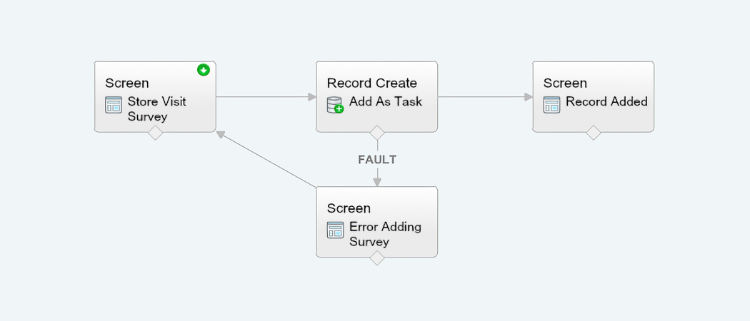
The solution I came up with was a simple flow that limited users to a specific set of enterable information, pre-filling the date of the activity, and marking the task complete when the activity was committed. Literally, the only thing they needed to do was select a picklist value and enter a comment about their visit. It was exactly what we were looking for.
The thing I didn’t like about the flow was that when a user entered it, context kind of got lost – meaning they started out from a contact record, but didn’t have a good visual cue about where they were once they got into the flow.
Sure, the flow was simple, but to me it’s still poor UX not to know the context of your work at all times. So, I decided to use a Visualforce page to solve the problem:
<apex:pagestandardController="Contact">
<apex:sectionheadertitle="Add Retail Store Visit"subtitle="{!Contact.Name}"></apex:sectionheader>
<flow:interviewname="Retail_Store_Visit">
<apex:paramname="vContact"value="{!Contact.Id}"></apex:param>
<apex:paramname="vAccount"value="{!Contact.Account.Id}"></apex:param>
</flow:interview>
</apex:page>
The trouble with this was that after the flow data was committed, the user would be returned to the beginning of the flow. That’s definitely not what I wanted. I needed to go back to the contact record I started from.
So I added the finishLocation attribute to the <flow:interview /> component tag. It would make sense that if I passed the Contact Id, the flow should return to the Contact record:
Nope. That didn’t do it. When the flow is entered, context gets lost, so Salesforce doesn’t really know where the user is anymore. Even using the vContact Apex parameter didn’t work.
I searched help documentation for an answer, but it wasn’t all that helpful. I searched Communities and came up empty. Then I searched the Salesforce Stack Exchange, where the only solution I could find was really convoluted, and didn’t even come close to solving my problem. I was vexed.
Taking a break to get a cup of coffee, a solution dawned on me that turned out to be pretty darned simple. All I needed was an Apex variable in the page, which I could pass to the finishLocation component tag once the flow was complete. Oddly enough, this method is not documented – at least not that I could find.
Using the Apex variable, users where returned to the contact record they started from, and could see the task they just added in the activity history related list. This was exactly what I was looking for. Everyone was happy.
If you need to return to a starting point when using flows and Visualforce pages, consider giving this solution a try.
I’ve been working on a force.com app with the requirement that a user must enter a valid email address on a Visualforce page before being able to save a record.
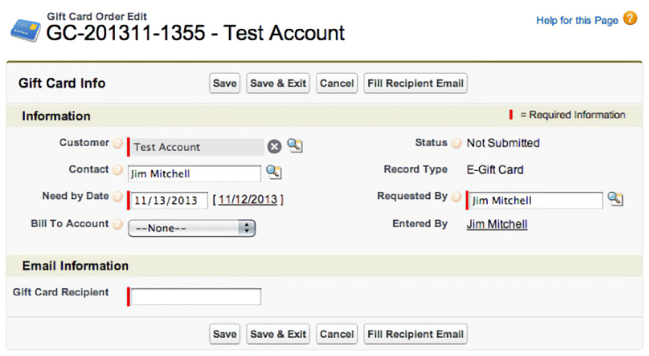
But they must also be able to insert the related contact’s email address by clicking a button instead of having to leave the edit page to go find it. That seemed simple enough, but it wasn’t. This is my solution for making a field appear required on a Visualforce page.
In my original Visualforce page, it seemed logical that if I set the recipient email field as required, all would work as expected. However, defining the field as required prevented my custom action in my page controller from firing and entering the email address.
Original Page Controller
publicclassGiftCardTestController{private ApexPages.StandardController std;public String cEmail {get;set;}public Gift_Card_Order__c gc {get;set;}publicGiftCardTestController(ApexPages.StandardController stdCtrl){
std = stdCtrl;}//selects the email address of the related contact
//and inserts into recipient email field.
publicvoidfillEmail(){
gc =(Gift_Card_Order__c)std.getRecord();
cEmail =[select Id, Email from Contact where Id =:gc.Contact__c].Email;
gc.Recipient_Email__c= cEmail;}}
In this example, the fillEmail() action should select the related contact email address, and put the value in the Recipient_Email__c field so the user can see it.
But it’s not that simple it seems. When the field had the required=“true” attribute set, the action would not fire because all validation is done on the client side and the page never posts back to the server — so the controller action never gets called.
So after some digging and asking for help on the Salesforce discussion boards, the solution was to make the Recipient_Email__c appear as if it’s required on the page (though it’s really not), and add a new save method to my controller to handle field validation on the server side when the record gets saved.
New Page Controller
publicclassGiftCardTestController{private ApexPages.StandardController std;public String cEmail {get;set;}public Gift_Card_Order__c gc {get;set;}publicGiftCardTestController(ApexPages.StandardController stdCtrl){
std = stdCtrl;}publicvoidfillEmail(){
gc =(Gift_Card_Order__c)std.getRecord();
cEmail =[select Id, Email from Contact where Id =:gc.Contact__c].Email;
gc.Recipient_Email__c= cEmail;}// add custom save method...
public pageReference save(){
gc =(Gift_Card_Order__c)std.getRecord();// if the recipient email is null, add an error to the field
// and return null to remain on the current page...
if(gc.Recipient_Email__c==null){
gc.Recipient_Email__c.addError('A valid email address is required.');returnnull;}// otherwise, the field is filled, so it's okay to redirect to view page.
// standard field validation will check for valid email format.
else{return std.save();}}}
Notice the <apex:pageblocksectionitem /> code to replace the original field. This is how we make the field appear with the “required” bar. A nifty trick that took some digging to discover. Hopefully, this post saves someone else the time it took me to figure it out — and me the time when I forget it.
For convenience, here’s a Github Gist with field label & inline help that shows exactly how to make a field appear required on a Visualforce page.
I had the need to add a bunch of named text files to a folder in the Finder on my Mac today.
I found it a pain to open BBEdit, make a new document, save it to where I wanted it, and then manually copy & rename the file back in the Finder. A lot of effort just to get 7 or 8 empty files with different names.
So, I threw together this little AppleScript to add empty files instead. The gist is once launched in the Finder (using FastScripts by Red Sweater naturally. Keystroke: cmd+option+shift+N), a dialog pops up that lets you enter a file title. Then the Finder creates that file in the front-most window. If no window is open, the file is added to your Desktop.
I found this to be more than twice as fast as the “traditional” method of making several files. Hopefully, it can help you out too. Remember, use it with FastScripts for quick keystroke access. Save as a script in the “Finder” scripts folder (“~/Library/Scripts/Applications/Finder/”).
property defaultFileName : "newFile.txt"tellmeto activate
set theFileName totext returnedof (display dialog "Enter a file name:" default answer defaultFileName)
tell application "Finder"
activate
if the (count of windows) is not0thenset theFolder to (folder of the front window) as textset theFolder to POSIX pathof theFolder
elseset theFolder to POSIX pathof (get path to desktop)
endifset addedFile to (theFolder & theFileName)
do shell script "touch '"& addedFile &"'"if the (count of windows) is not0thenset addedFile to (POSIX file addedFile) as alias
select addedFile
endifendtell
Here’s an AppleScript I use to quickly toggle desktop visibility for taking screenshots and recording screencasts that I thought might be useful for others.
Copy the source and paste the code into AppleScript Editor, or your editor of choice, compile and save. As always, scripts like this work best using FastScripts from Red Sweater Software.
tell application "System Events"set frontMostApp tonameof the first process whose frontmostistrueendtelltryset theDefault to ((do shell script "defaults read com.apple.finder CreateDesktop") as integer) as boolean
onerror-- if the default value doesn't already exist, create it.
do shell script "defaults write com.apple.finder CreateDesktop 1"set theDefault to ((do shell script "defaults read com.apple.finder CreateDesktop") as integer) as boolean
endtry
do shell script "defaults write com.apple.finder CreateDesktop "& (((not theDefault) as integer) as string)
tell application "Finder"to quit
delay 1tell application "Finder"to launch
tell application frontMostApp to activate
Note: This single script turns off the desktop if it’s on, and turns it on if it’s off - just to clear up the question if asked.
Some time ago, I set up my Gmail account in Apple Mail to copy over messages which were not sent to my jimmitchell.org account. I’m one of those guys who likes to have everything all in one place at my fingertips when I need it.
After copying over the messages I wanted, I completely removed the Gmail IMAP account from Mail and went about my business. Soon after, when I went searching for a specific email, I experienced the phenomenon of ghost emails in the search results.
These are messages that Mail once knew about, but no longer knows where they exist. The ghost emails were all from the since removed Gmail account.
If you’re experiencing the same problem, here’s a very simple fix to rebuild the Apple Mail envelope index.
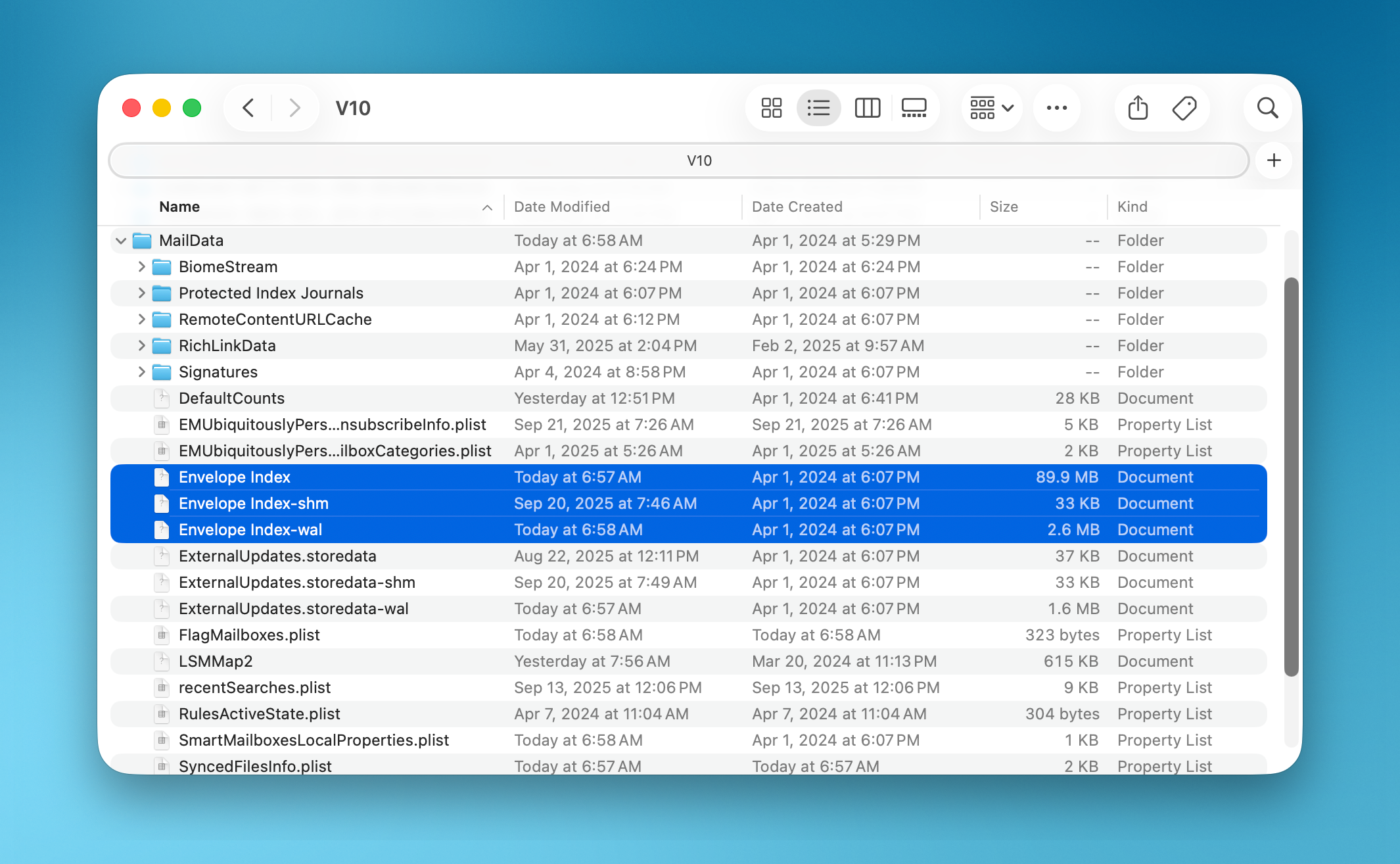
First, quit Apple Mail if it’s running, then navigate your way to ~/Library/Mail/ (where “~” is your home folder) in the Finder. Once you’re in the Mail folder, you’ll see a file named “Envelope Index” which keeps track of where all messages are located. Rename “Envelope Index” to “Envelope Index Backup” (We don’t want to trash the file just yet).
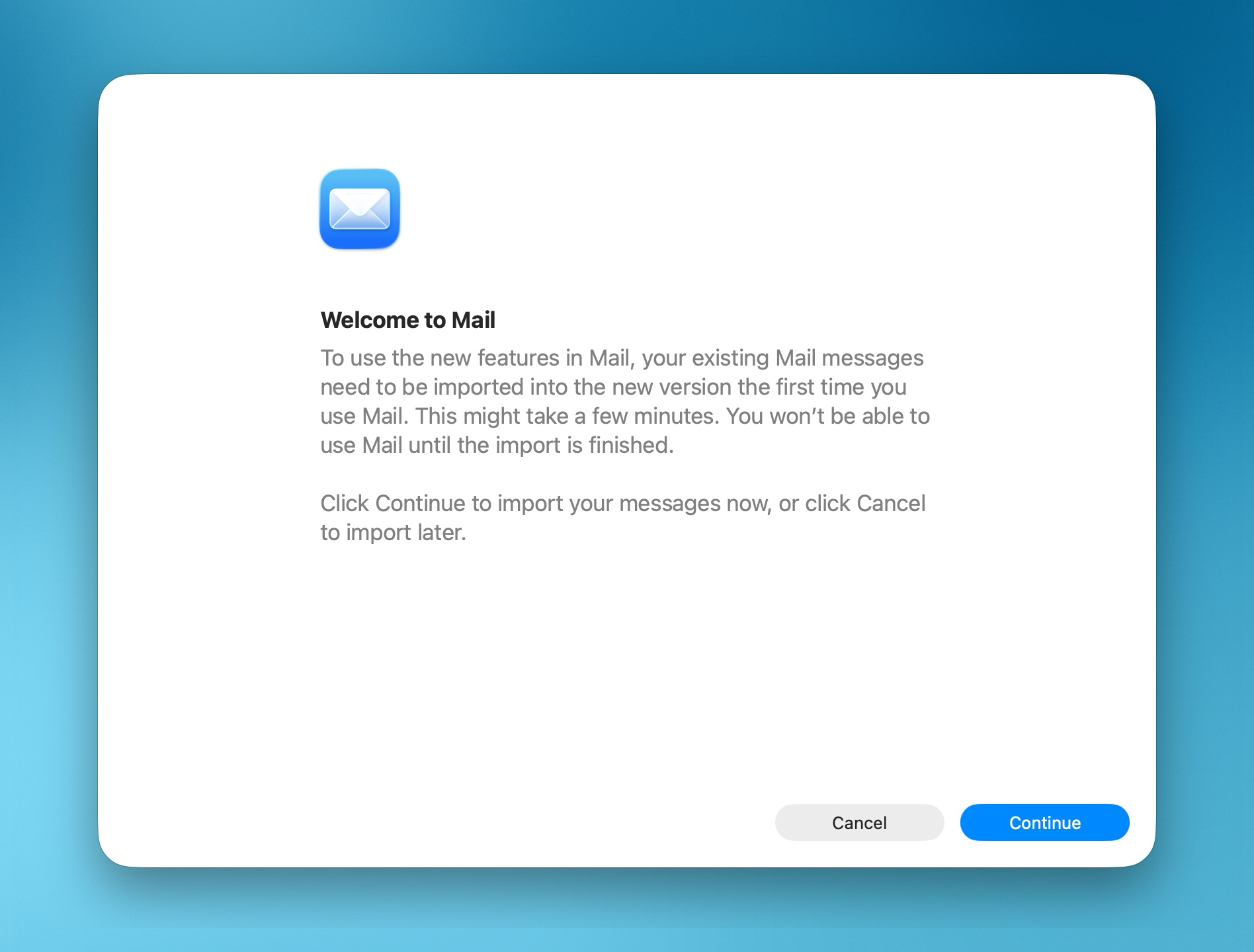
Then, relaunch Apple Mail. You’ll be presented with a daunting “Message Import” dialog that looks like your email account was wiped out and you’re starting all over. Fear not. You’re simply rebuilding the Envelope Index at this point.
Click “Continue” to rebuild the index. Once it’s done, all those pesky phantom messages will be gone the next time you perform a search in Mail (Yay!). You can then go back to the ~/Library/Mail/ folder in the Finder and move the file you renamed to “Envelope Index Backup” to the Trash.
And there it is. Your Apple Mail Envelope index has been rebuilt. A very simple solution to a problem that has baffled some of the best Mac users.